Projects
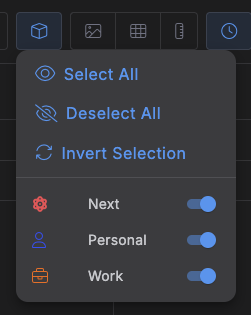
Click the cube icon in the top toolbar to choose which projects' items show up on the Calendar or Kanban board. Only shown in those two views.
A popover lists every project, each with its own icon, color, and a switch -- on means visible, off means hidden. Three buttons above the list handle the common cases in one click:
- Select All -- show every project.
- Deselect All -- hide every project.
- Invert Selection -- flip visible/hidden for all of them at once.
Note
This filter isn't saved -- it resets to "everything visible" whenever you reload the page, though it does survive switching views, dates, or dialogs since none of those reload the app.