Subtasks
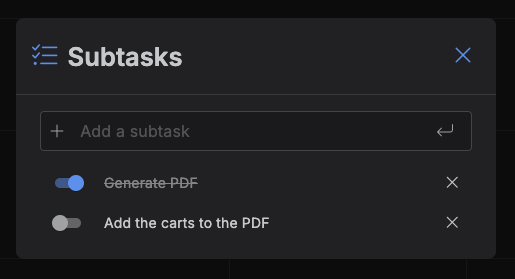
Subtasks is a small standalone popup for checking off a checklist on an item, without opening the full Create/Edit Item dialog. It's the same subtask list that lives in that dialog's Subtasks section -- just on its own, for when that's all you need.
Opening Subtasks
Ctrl/Cmd + double-click an item -- on the Calendar
(Day/Week/Month, including the all-day strip) or on a Kanban
card -- to open it directly. A plain double-click opens the full
Create/Edit Item dialog instead.
Note
Ctrl/Cmd + double-click on an item created by a plugin shows the plugin-info message
instead -- Subtasks isn't reachable for those items.
Managing subtasks
- Type into Add a subtask (auto-focused when the dialog opens) and press
Enterto add one. - Toggle a subtask's switch to mark it done.
- Double-click a subtask's title to rename it --
Ctrl/Cmd+Enteror clicking away saves it,Escapereverts. - Click the × on a row to remove it.
Every change here saves immediately -- there's no Save button, and closing the dialog never discards anything.
If the item's status is a Done-type status and you uncheck one of its subtasks, its status moves back to an In Progress status automatically, same as in the full editor.
Closing
Click the X, press Escape, or click outside the dialog.