Analytics
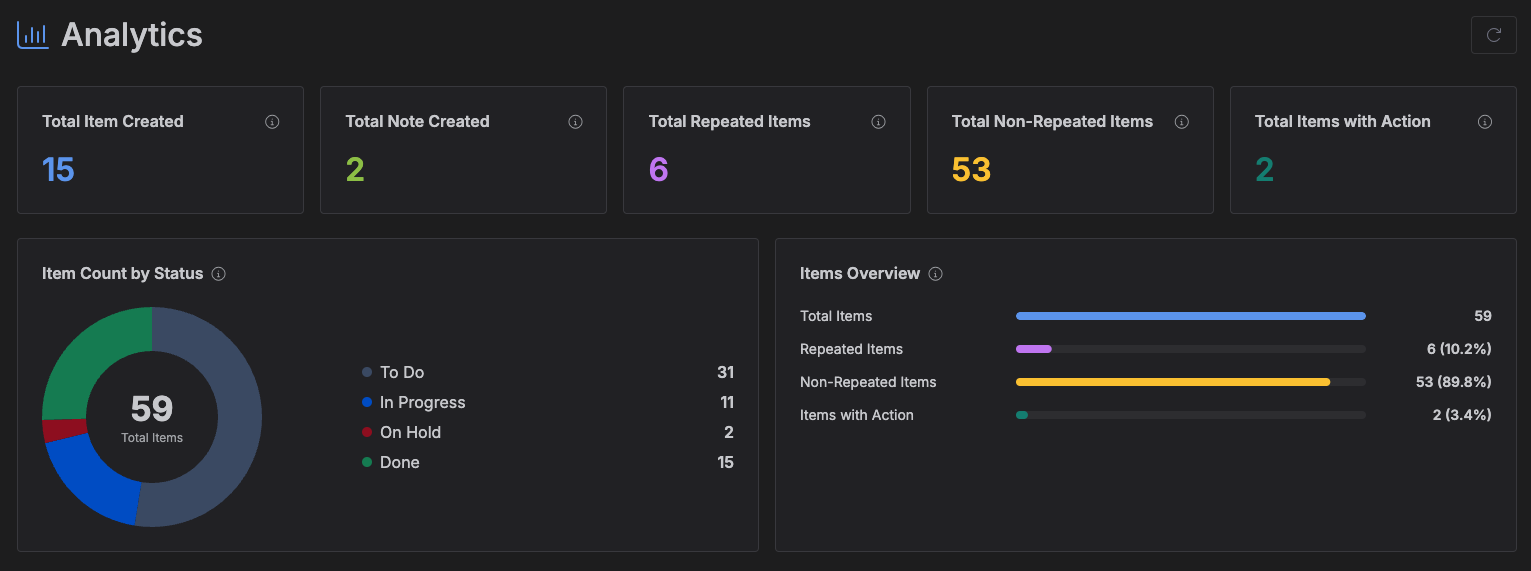
Analytics gives you an overview of the items and notes across every project you belong to -- counts, a status breakdown, and a per-project table.
Accessing Analytics
Click Analytics in the left toolbar.
What you'll see
- Summary cards -- Total Items Created, Total Notes Created, Total Repeated Items, Total Non-Repeated Items, and Total Items With Action.
- Status breakdown -- a donut chart of your items by status (colored to match your statuses), with a legend and a total count in the center.
- Items overview -- the same Total/Repeated/Non-Repeated/With Action counts as progress bars, each showing its share of the total.
- Per-project table -- one row per project, broken down the same way, plus a column for each of your statuses, with a totals row at the bottom.
Click the refresh icon in the header to recompute everything. Everything shown covers all your projects and your full item history.