Hotbox
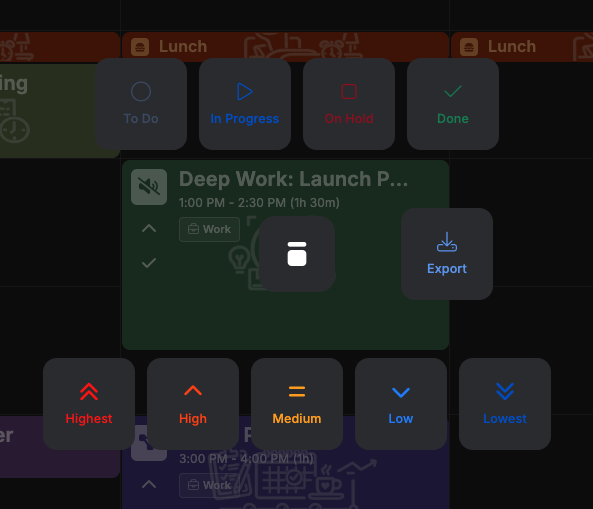
Hotbox is a right-click-and-hold radial quick-action menu for Calendar, Kanban, and milestone items -- change a status or priority, jump to a meeting link, or export the item, all without opening the full Create/Edit Item dialog.
Opening Hotbox
Press and hold the right mouse button on an item -- on the Calendar (Day/Week/Month, including the all-day strip), on a Kanban card, or on a row in a milestone's item table -- and drag. A dark overlay appears with a pivot at your click point and a line that follows your cursor. Drag onto one of the cards that appear around the pivot and release to apply it.
Note
Hotbox isn't available for items created by a plugin.
What you can do
- Status -- a row of cards above (or below, if there isn't room) the pivot, one per task status you've configured.
- Priority -- a row of cards below the pivot, one per priority you've configured.
- Links -- a column of cards to the left of the pivot, one per meeting/URL link found in the item's description. Releasing on one opens it in a new tab. Only shown if the description has a detectable link.
- Export -- a card to the right of the pivot. Releasing on it downloads the item as an
.icsfile.
Priority always updates the item itself. Status usually does too, except when you're viewing a specific day of a repeating item that already tracks status per day -- then it updates just that day instead of the whole series. From a milestone's item table there's no specific day in view, so Status there always updates the item itself, the same as Priority.
Canceling
Release over empty space, back near the center pivot (it grows as you approach it, to signal
you're about to cancel), or press Escape at any time -- nothing is applied.